

Twitter Phishing Campaigns Leading to Account’s Takeover
Recently, SEAL received a significant number of requests for assistance from users affected by a sudden loss of control over their X accounts. The following phishing campaigns are operated by multiple unrelated parties and utilize a range of tactics for gaining access to user accounts.
Different Themes
Each attack begins with a well-formatted and convincing email received by the targeted party. Emails are often sent directly from an attacker-controlled server; however, email marketing services like SendGrid are also utilized.
We observed the following lures.
- DMCA Takedown Notice - Strike Issued
- Content Dispute Filled / Content Issue
- An attempt to log in to your account
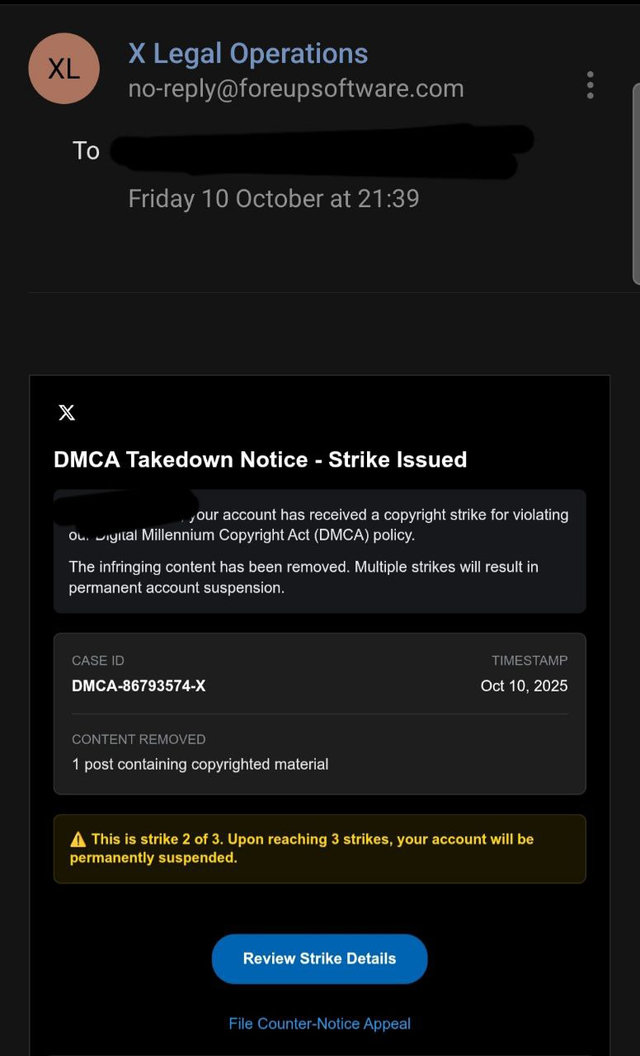
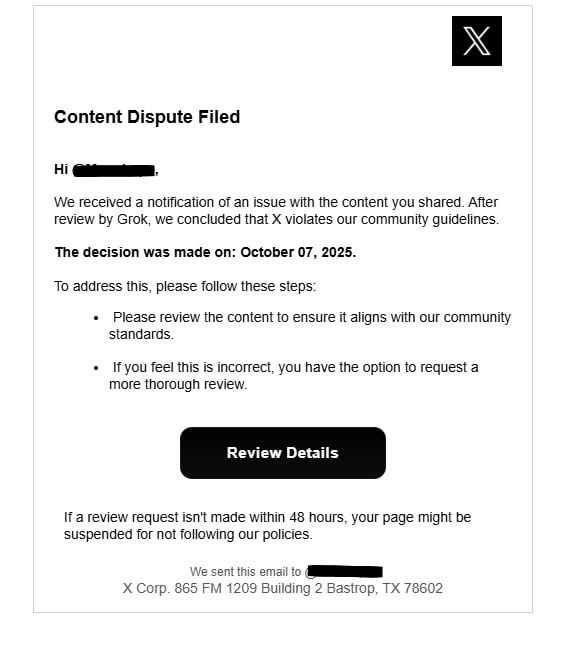
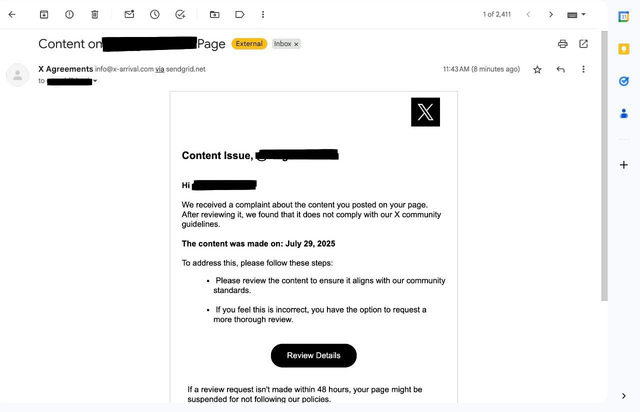
Upon clicking the ‘Review Details’ button, the user is redirected either to a fake X.com login page or, in the case of a DMCA/Copyright strike, another convincing lure that loads one of the user's own posts to lend even more credibility to the attack.
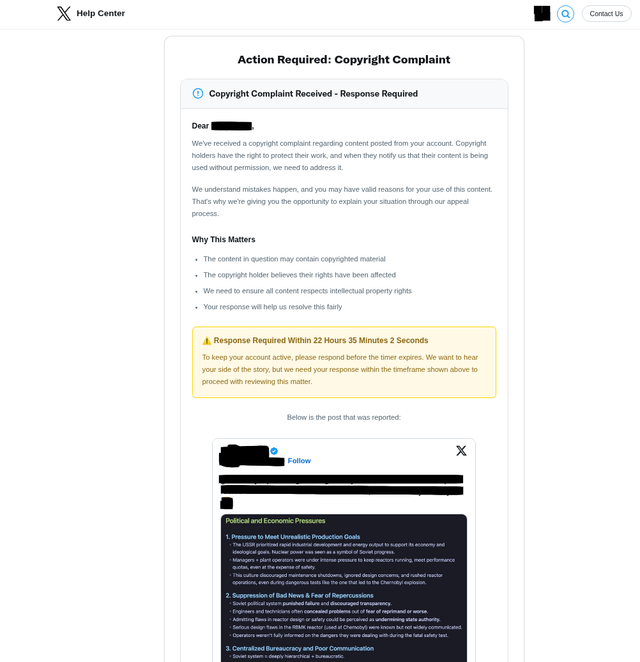
The sophistication of attacks varies. In many cases, the phishing kits are hosted directly on suspicious domains like x-arrivals[.]com or x.copyright[.]us.com. In such cases, attackers collect entered credentials directly through the login page form.
OAuth Consent Phishing
The more advanced variant of the attack we observed uses an attacker-controlled domain only as a means to immediately redirect users to X.com and authorize a malicious application through the X.com OAuth service.
Similarly, the user initially receives an alert in their email.
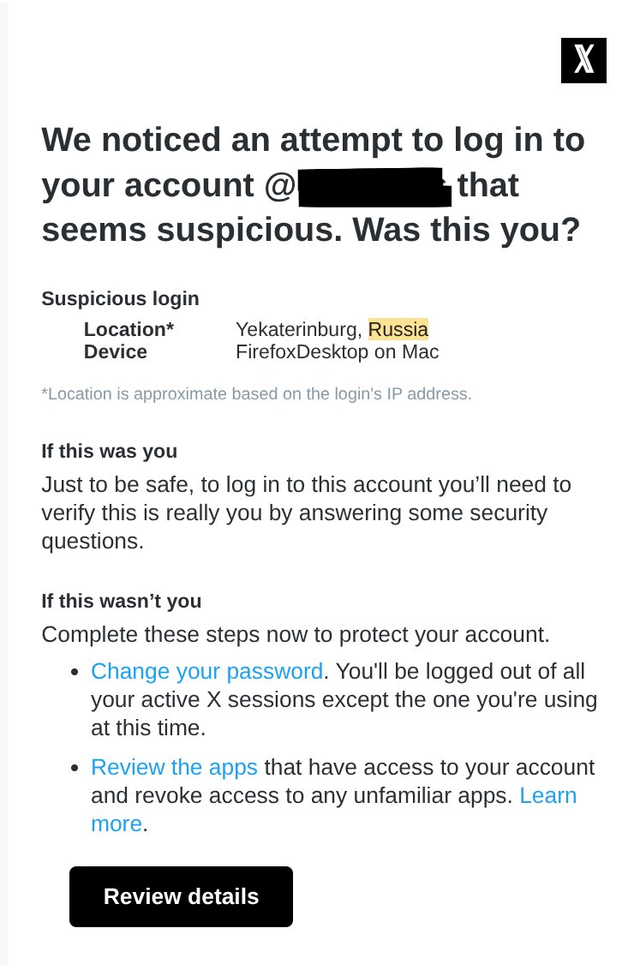
Upon clicking the “Review Details” button, the user is immediately redirected from account-updates-x[.]com/login.php (hosted on the phishing server) to the actual X.com authorization page. The only task of login.php is to immediately respond with an HTTP 302 redirect.
Afterwards, the user is landing on the real, secure X.com website. Their browser’s address bar shows a legitimate X.com URL with a valid SSL certificate. However, they are not on a login page. They are on an application authorization screen.
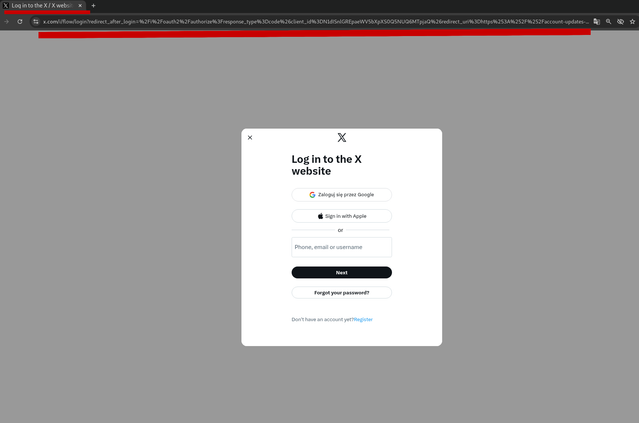
We can see what's actually happening by breaking down the parameters in the malicious OAuth URL.
https://x\[.]com/i/oauth2/authorize?response\_type=code\&client\_id=N1dISnlGREpaeWV5bXpXS0Q5NUQ6MTpjaQ\&redirect\_uri=https%3A%2F%2Faccount-updates-x.com%2Foauth.php\&scope=tweet.read+tweet.write+users.read+offline.access\&state=45036e402110afb9f35214fcc06b608f\&code\_challenge=6v0keLii0VKrrR7ERD1MUk4jB34nANFfXAEioKyA\_mA\&code\_challenge\_method=S256\
The URL contains several critical parameters.
response_type=code: This tells X.com that the attacker's application wants to receive a temporary authorization_code after the user approves the request.
client_id=...: This is the unique identifier for an application that the attacker registered with X. The attacker may have given it a deceptive name like "X Security Checker" or "Profile Insights".
scope=tweet.read+tweet.write+users.read+offline.access: The attacker is requesting a specific list of permissions, such as:
tweet.read: Reading all of the tweets.tweet.write: Posting new tweets and deleting existing ones as account owner.users.read: Seeing profile information and follower data.offline.access: Maintaining access to account even when the owner is not logged in.
redirect_uri=https%3A%2F%2Faccount-updates-x.com%2Foauth.php: This parameter tells X.com, "After the user clicks 'Authorize', send their browser back to this URL on the attacker's server.
state=...: A security token generated by the attacker to prevent cross-site request forgery (CSRF).
code_challenge and code_challenge_method: These are part of a security mechanism called PKCE. The attacker uses them to generate a cryptographic proof that ensures only their server can exchange the authorization_code for a permanent token.
If the user approves the above OAuth request, their browser is sent back to the attacker's oauth.php page with the one-time-use authorization_code. The attacker's script grabs this code and uses it to establish persistent access to the user's account.
Attackers are known to utilize diverse URL cloaking techniques and different strategies for building the final OAuth URL. The redirect chain can include URL shortening as well as 3rd party platform redirect services. For example:
- Link in the e-mail:
https://t.co/ShortURL - Opens attacker controlled host with redirect script:
https://infodeskhelp[.]com/ - Immediately redirect to X.com Application OAuth URL
Another example. Utilizing the legitimate click.meetup[.]com service as the initial lure (redirect):
- Link in the e-mail:
http://clicks.meetup.com/ls/click?upn=u0… - Opens attacker controlled host:
https://solution.developer.kinesis[.]ro/oauth_start.php - Open attacker controlled host with redirect script:
https://solution.developer.kinesis[.]ro/authorize.php - Immediately redirect to X.com Application OAuth URL
Techniques vary, in some cases the redirect is set directly on the root domain, without the actual *.php path. In other cases we observed multiple redirect domains chained together before finally arriving at the malicious OAuth URL. As was the case of the attacker utilizing SendGrid.net to deliver malicious lure.
- Link in the e-mail (embedded by SendGrid.net):
https://u51621563.ct.sendgrid.net/ls/click?upn=u001. - First redirect:
https://book-format[.]de/secure - Second redirect:
https://helpcenter-x[.]com/ - Internal ID tracking:
https://helpcenter-x[.]com/oauth?identifier=1abe3aa5-c4cf - The final redirect to X.com Application OAuth URL
How to stay secure
Users are advised to always review the URL they are visiting for a potential mismatch as well as the e-mail address from which they have received the notification. It’s important to note that such attacks are not only limited to X.com but can happen on any platform that uses app integrations (like Google, Facebook, Microsoft, etc.). A real email will be from @x.com / @google.com / @facebook.com.
While some legitimate X.com notifications do include clickable buttons, the safest practice is to avoid clicking them. Instead, open a new browser tab and navigate directly to X.com (Settings -> Help Center) to check for alerts.
In an OAuth attack, the final step happens on the real X.com site. Be suspicious if an unexpected security alert takes you directly to an app authorization page. On that page, carefully review the application's name and the permissions it requests. The OAuth app URLs are usually long and readable strings listing these parameters. If an app you don't recognize is asking for permissions to post tweets or access your DMs, deny it.
Regularly review apps connected to your account and revoke access for any you don't recognize.
Add 2FA authentication to your X.com profile (OAuth Consent Phishing can bypass this protection).
Report To SEAL
If you encounter a suspicious looking e-mail, do not hesitate to contact SEAL at @seal_tips_bot (Telegram Channel).